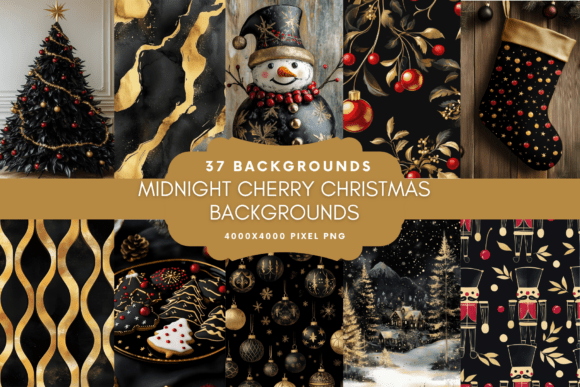
Festive Digital Papers: 10 Christmas Backgrounds
The holiday season brings a specific kind of creative urgency. Whether you are a small business owner prepping a seasonal marketing campaign, a scrapbooker documenting family memories, or a designer building out a brand’s festive assets, the visual foundation of your project matters. A generic red and green pattern often fails to convey the nuance of a modern holiday aesthetic. This is where the 10 Christmas Digital Paper Backgrounds collection steps in, offering a curated set of textures that balance traditional festive cheer with contemporary design utility.
This collection isn't just about random ornaments on a white background. It features ten distinct patterns designed to serve as the "canvas" for your work. Think of these files not just as decorations, but as fundamental design assets that solve the problem of finding high-quality, high-resolution textures for both digital and physical outputs.
Understanding the Aesthetic: More Than Just Clipart
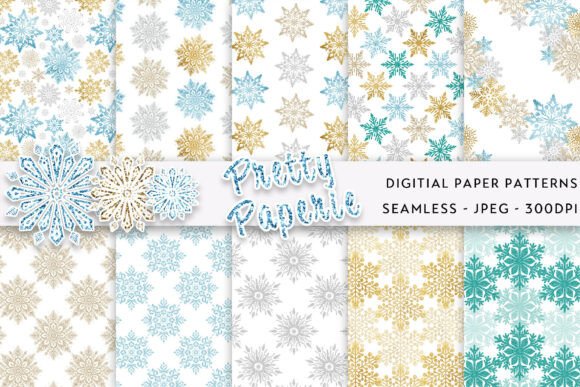
When we look at a set like the 10 Christmas Digital Paper Backgrounds, the first thing to analyze is the visual personality. Effective holiday design avoids looking cluttered. These backgrounds are crafted to be "supporting actors." They provide texture, color, and festive atmosphere without overpowering the foreground content—be it text, a photo, or a product image.
The style of these papers typically leans into seamless repetition, ensuring that whether you are tiling them for a web design background or printing them on a large sheet of wrapping paper, the pattern doesn't break awkwardly. The color palettes usually range from deep, rich jewel tones to crisp, modern pastels, allowing for versatility across different brand identities. A high-quality digital paper collection acts as a premium font does for typography; it sets the mood instantly.
For the entrepreneur or designer, the appeal lies in the "flatten and go" nature of these assets. They are rasterized at 300 dpi, which is the industry standard for print quality. This means you don't have to worry about pixelation when you take these designs from the screen to the physical world.
Practical Applications: From Screen to Print
The versatility of a digital paper pack is defined by its resolution and dimensions. At 3600 x 3600 px, these files are square, which offers a distinct advantage in modern layout design. Whether you are creating an Instagram post, a square flyer, or a scrapbook page, you have a generous canvas to work with. Here is how different professionals can utilize the 10 Christmas Digital Paper Backgrounds:
For the Brand Strategist and Marketer
Consistency is the cornerstone of brand identity. During the holidays, brands often struggle to adapt their year-round look to the festive season without looking disjointed. Using a consistent set of digital papers across your social media graphics, email headers, and website banners creates visual cohesion.
Imagine you are designing a holiday email campaign. Instead of a plain white background, using a subtle geometric pattern from this collection adds depth. If you are pairing these backgrounds with a modern typography stack—perhaps a bold display font for headlines and a clean sans serif font for body text—the textured background helps the text "pop" without clashing.
For Packaging and Product Design
If you sell physical products, packaging is your silent salesperson. These digital papers are perfect for creating custom wrapping paper designs or box liners. Because they are high-resolution, you can scale them up significantly for large format printing. A boutique candle maker, for example, could use a specific pattern from the pack to wrap their gift sets, instantly elevating the perceived value of the product.
Furthermore, these files work beautifully for gift tags and stickers. You can print a sheet of the pattern, die-cut it into shapes, and use them to seal packages. This level of detail in packaging design signals professionalism and care to your customers.
For Crafters and Hobbyists
The 10 Christmas Digital Paper Backgrounds are a staple for scrapbooking layouts and papercraft. Digital scrapbooking has become incredibly popular because it allows for infinite editing without the mess of glue and scissors. These papers serve as the base layer for your pages. You can layer photos, frames, and embellishments on top of them.
For physical crafters, the application is just as robust. You can print these designs onto cardstock to create custom cards, envelope liners, or even origami boxes. The 300 dpi resolution ensures that the ink sits crisply on the paper, maintaining the vibrancy of the colors.
Technical Considerations for Designers
When integrating these assets into your workflow, it is important to understand the file specifications. The collection comes as JPG files within a ZIP archive. JPGs are universally compatible with software like Adobe Photoshop, Illustrator, Canva, Procreate, and Affinity Photo.
However, as noted in the product details, these are flattened raster files, not vector format. This distinction is crucial for professionals. A vector file (like an SVG or AI) can be scaled infinitely without losing quality. A raster file is made of pixels. While 3600px is large enough for most standard applications, you should avoid trying to scale these files up to billboard size.
For web design, you will likely need to optimize these files before uploading them to a website. A 3600px wide image at 300 dpi can be several megabytes in size, which will slow down your site's load speed. Use compression tools to reduce the file size while maintaining visual clarity.
Strategic Use of Texture in Layouts
Using a busy background requires a thoughtful approach to visual hierarchy. If you place text directly over a complex pattern, readability drops. Here are a few strategies to get the most out of the 10 Christmas Digital Paper Backgrounds:
- The Overlay Technique: Place a semi-transparent shape (like a white rectangle or a dark gradient) over the pattern where your text will sit. This creates a "safe zone" for legibility while keeping the festive texture visible around the edges.
- Color Matching: Use a color picker tool to sample a color directly from the digital paper. Use this color for your text or headline typeface. This creates an intentional, harmonious look, as if the text belongs to the pattern.
- Framing: Use the digital paper as a border or frame for a central image. This works exceptionally well for editorial design, such as magazine covers or blog post headers.
Commercial Licensing and Usage
For entrepreneurs and agencies, the commercial aspect is vital. The 10 Christmas Digital Paper Backgrounds are noted as being suitable for personal and commercial use. This means you can use them in products you sell, such as POD (Print on Demand) items, or in client work.
However, you cannot resell the files themselves as a digital asset. You cannot simply zip these 10 files and sell them to someone else as a paper pack. The value you add must be in the design work you do with them. Whether you are creating a logo design background or a set of holiday invitations, the final product is yours to monetize.
Conclusion
The holiday season is a time of opportunity for creators and businesses. Having a reliable set of design assets like the 10 Christmas Digital Paper Backgrounds removes the friction from the creative process. By combining these high-quality textures with strong font pairing and solid layout principles, you can produce professional-grade work that captures the spirit of the season and engages your audience effectively.